The Carel STone build error that was really an empty Git repo
Contents
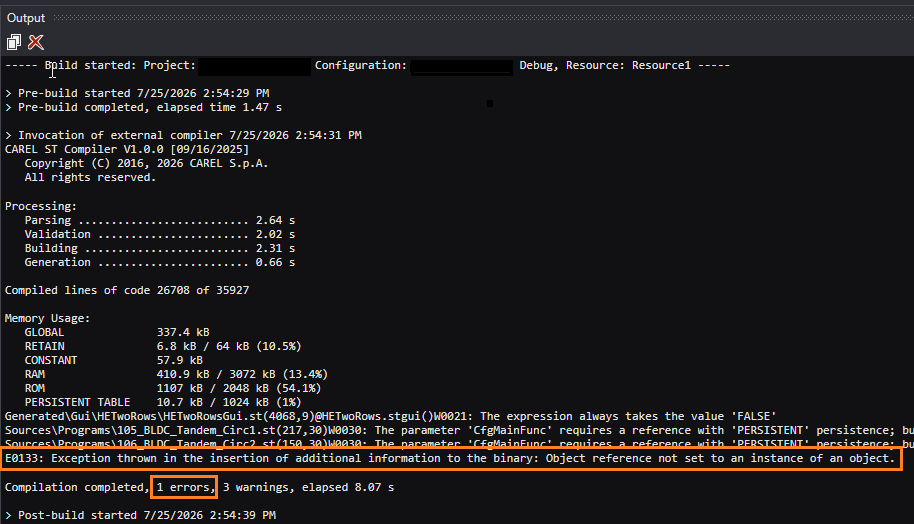
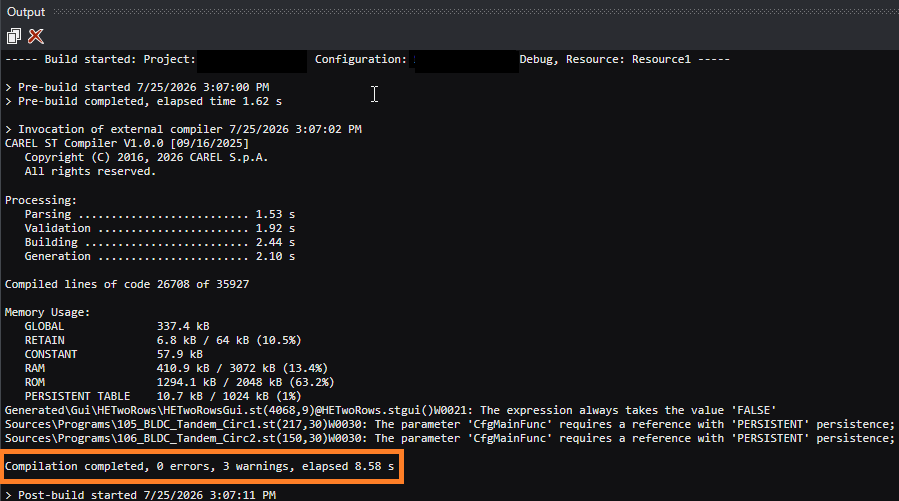
The compiler was happy. 26,708 lines of Structured Text compiled, zero errors, memory budget green. Then the build died on the very last step, with a message that pointed at nothing:
E0133: Exception thrown in the insertion of additional information to the binary:
       Object reference not set to an instance of an object.
A null reference. No file. No line number. After a clean compile. On a Carel STone toolchain, where this error is documented exactly nowhere.
Here is where it actually came from — because the fix turned out to be a single Git commit, and the cause is something STone does quietly that nobody writes down.
The symptom
The Structured Text compiled perfectly — parsing, validation, building and code generation all passed, memory usage well inside budget. The failure appeared only in the post-build step, “insertion of additional information to the binary,” as a .NET-style null reference.
Two things made it maddening:
- The compiler reported 0 errors. The E0133 arrived after a successful compile.
- The message has no file, no line, no offending symbol. “Object reference not set” is the least specific error in the .NET world.
Removing the obvious suspects
Before theorising, I cut the search space down by hard evidence.
Is it my code? I rebuilt my untouched base application. It built cleanly. I then compared it to my working copy file by file: 679 files, byte for byte identical. Same source, opposite result.
Is it stale build state? I wiped every generated artifact (Generated/, Output/, obj/, bin/) and rebuilt. Still dead — three times in a row, deterministically. Not a race, not corruption.
So the source was innocent and the build cache was innocent. The trigger had to live outside the project.
Changing one variable at a time
I copied the whole solution to a different folder and built it there. It built cleanly. I copied the exact same bytes back next to the original. It failed with E0133. Same content, different location — so the environment around the folder was the variable.
I narrowed it with a simple A/B matrix:
| Condition | Result |
|---|---|
| Project inside a fresh Git repo, no commits | E0133 |
| Identical copy outside any Git repo | clean build |
Copy + git init, still no commit | E0133 |
| The same copy after one commit | clean build |
Original with .git temporarily renamed away | clean build |
The pattern held in every direction. The only thing the failing folders shared was a Git repository with no commits yet — a repo whose git rev-parse HEAD returns nothing, because there is no HEAD.
The root cause
During post-build, Carel STone reads your Git HEAD — effectively git rev-parse HEAD — to stamp the commit hash into the firmware image. A brand-new repository has no commits, so there is no HEAD to resolve. The lookup returns null, and that null walks straight into E0133.
In other words: a missing commit, wearing the mask of a memory error.
And to be clear, an empty repository is not a mistake. git init before your first commit is a completely normal state — it is where every project lives for its first few minutes. The defect is a build step that assumes a commit already exists and crashes with a null reference instead of saying “no commit found.”
The fix
Make one commit.
git add -A
git commit -m "Initial import"
With a HEAD present, git rev-parse HEAD returns a real hash, the post-build step stamps it, and the build completes with 0 errors — no source change, no toolchain flags, nothing disabled. Git versioning stays exactly as you want it.
Proof: the commit really is inside flash.bin
If STone stamps the commit, it should be visible in the output binary. It is.
Open the built flash.bin, search the raw bytes, and the full 20-byte commit SHA-1 sits at a fixed offset (here 0x11469e), preceded by a small tag:
offset 0x11469e:  00000301 | 79f09ed7234cd1b62299b9fa60542f45b91cf8ef | ...
                  (tag)      └──────────── git HEAD (20 bytes) ──────────┘
To prove it follows HEAD and isn’t a coincidence, I ran a live before/after: build at commit A, confirm A is in the binary; make a new commit B; before rebuilding, B is not in the binary (0 matches); rebuild, and now B is present and A is gone.
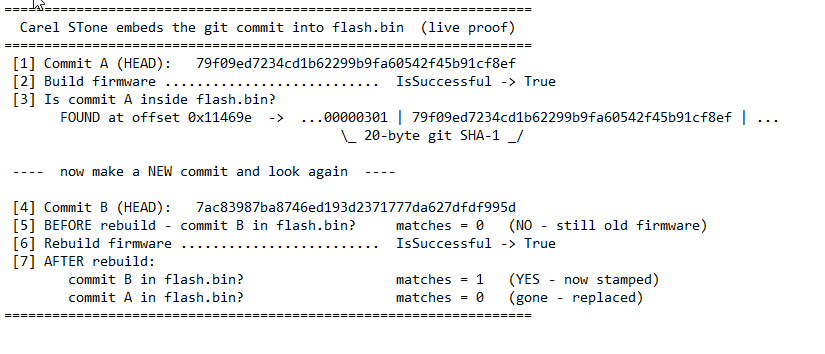
The firmware carries the exact commit it was built from — precise, free traceability, hidden behind an error that reads like a crash.
A red herring worth naming
The failing build also emitted around forty “library has a lower version than the latest used in project” warnings (W0001) — nested libraries such as Math, Timer, GetTime, Hysteresis bundling older copies of shared dependencies. They look alarming and they are pure noise. They appear only on the failing post-build path and vanish the moment the build succeeds; on a healthy build STone unifies nested library versions to the newest one silently. The scariest-looking symptom had nothing to do with the actual cause.
Where the build info shows up on the controller
The legitimate “additional information” STone embeds — application version, build date and project GUID — is reachable at runtime and on the display:
System.GetProjectInfo()returns version, build timestamp andProjectID(the project GUID).System.GetSystemInfo()returns firmware, bootloader and VM versions.- The stock GUI widgets (
BOOT_FW_SW_Widget,GUIDWidget) put BOOT / FW / SW versions and the GUID on a pGD1 info screen. The SW number comes from the project’sprojectVersion— not from Git.
One caveat if you ever go looking: the application commit hash embedded in flash.bin is not exposed by any System.* call. The only commit hash available at runtime is System.FwCommitHash(), and that is Carel’s firmware commit, not your application’s. The closest runtime fingerprint of your own build is System.GetBinaryCrc(), a CRC that changes on every build. If you need your own commit on the controller, generate it into a Structured Text constant in a pre-build step and expose it yourself.
Takeaways
- When a build tool throws a null reference at an odd step, suspect it is reaching for something in your environment — Git, the network, a path — that isn’t there.
- Reproduce on a copy and change one variable at a time. “Byte-identical source, different result” points straight at the environment, not the code.
- The scariest error text and the real cause are often unrelated. Follow evidence, not adjectives.
- A fresh Git repository with no commits is a normal state — but some toolchains treat “no HEAD” as null, and null as a build that dies explaining nothing. Commit first, then build.